
Raven Does Not Download / Download is Corrupt
Description
The Raven installer cannot be downloaded, or the downloaded file is corrupted.
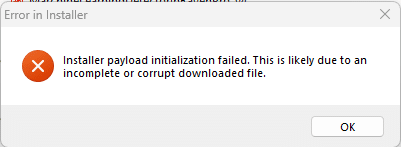

Problem
Raven installers are quite large. If you have a slow network connection the installer may take a long time to download, which increases the likelihood that the installer will become corrupted during the download. You may be able to resolve the problem by improving the speed and reliability of your network connection using one of the strategies below.
Try using another web browsers
- Delete the corrupt Raven installer.
- Download another installer from Raven Pro downloads or Raven Lite downloads using a different web browser. (Sometimes one web browser works when another fails.)
- Install Raven Pro. (You must have admin privileges to do this!)
- If none of your web browsers can download the installer without corrupting it, proceed to the next section.
If you use Wifi to connect to the Internet
- Delete the corrupt Raven installer.
- Move computer close to your Wifi router to improve the signal strength. The Raven download is large, so you will need a strong signal.
- For more ideas about how to improve your Wifi connection, see These Things Are Blocking Your Home’s Wifi Signal.
- Download another installer from Raven Pro downloads or Raven Lite downloads.
- Install Raven Pro. (You must have admin privileges to do this!)
- If you cannot download an installer without corrupting it, proceed to the next section.
If you have access to an Ethernet connection
- Delete the corrupt Raven installer.
- Plug your computer into an Ethernet network with Internet access. (Ethernet typically provides faster, more reliable network access than Wifi.)
- Download another installer from Raven Pro downloads or Raven Lite downloads.
- Install Raven Pro. (You must have admin privileges to do this!)
- If you cannot plug your computer into an Ethernet network, proceed to the next section.
If your computer cannot plug into Ethernet
- Delete the corrupt Raven installer.
- Find a computer that has Ethernet access.
- Download another installer from Raven Pro downloads or Raven Lite downloads.
- Copy the installer onto a thumb drive or some other portable drive.
- Plug the thumb drive or other portable drive into your computer and copy the installer onto your computer.
- Install Raven Pro. (You must have admin privileges to do this!